API reference
notifi API documentation
One endpoint, seven parameters. One source generates this page, /openapi.json
and the client collections, so they cannot disagree.
Quickstart
Install notifi on iPhone or iPad
or Mac, allow notifications, open Keys and copy the
Device key. It starts with nk_.
curl -X POST https://notifi.it/send \
  -H "Authorization: Bearer $NOTIFI_KEY" \
  -d "title=Hello from notifi" \
  -d "message=Your first notification." \
  -d "link=https://notifi.it/docs" \
  -d "image=https://notifi.it/anaglyph-bell.png"
Authentication
Use a bearer token. A key parameter works too, but ends up in server logs. Use it for a quick test only, then rotate the key.
| Method | Sent as | Notes |
|---|---|---|
| Bearer token | Authorization: Bearer nk_yourkey |
The send key from the app’s Keys tab, as Authorization: Bearer nk_yourkey. Preferred: edge logs and shell history do not record a header. |
| Parameter | key=nk_yourkey |
The send key as a parameter. It appears in edge logs, in shell history and in any proxy in between, which makes it the weaker option. Use it only for a quick test, and rotate the key afterwards. |
Request
POST https://notifi.it/send as JSON, form-encoded or multipart.
GET takes the same parameters in the query string, for quick tests only:
rotate the key afterwards. Query parameters win over body fields.
POST /send HTTP/1.1
Host: notifi.it
Authorization: Bearer nk_yourkey
Content-Type: application/json
Accept-Language: en-GB

{"title":"Hello from notifi","message":"Your first notification.","link":"https://notifi.it/docs","image":"https://notifi.it/anaglyph-bell.png"}
Parameters
key is required unless the request carries a bearer token.
| Name | Type | Required | Limit | Description |
|---|---|---|---|---|
key |
string | conditional | nk_… |
The send key, unless you send it as a bearer token. The key picks the device that receives the notification. Two keys, comma-separated, send to two devices in one request, one per platform. |
title |
string | required | 1–200 chars |
The notification title. notifi crops a longer title and adds a warning to the response. |
message |
string | optional | ≤ 16,000 chars |
The notification body, in Markdown. notifi crops a longer body and adds a warning. |
link |
string (uri) | optional | ≤ 2,048 chars |
A link to a website or internal app. Opens when you tap the notification. https always opens; another scheme (shortcuts://run-shortcut?name=Deploy, or an app’s own deep link) opens only when the key’s Open any link switch is on in the app, and the app hides the link otherwise. |
image |
string (uri) | optional | ≤ 2,048 chars |
URL of an image shown with the notification. The receiving device fetches it; the server never does. By default the app loads it only when you tap it. |
occurred_at |
integer | optional | unix ms |
When the event happened, as unix milliseconds. For a queued or retried send. Only changes the timestamp shown in the app; defaults to the time the server accepted the request. |
is_critical |
boolean | optional | none | Breaks through Focus. The key must also have urgent alerts switched on in the app, or notifi delivers an ordinary notification. |
Response
202 means accepted. Delivery is best-effort, per the
terms. Every status the endpoint can answer:
HTTP/1.1 202 Accepted
Content-Type: application/json; charset=utf-8

{"ok":true}
HTTP/1.1 400 Bad Request
Content-Type: application/json; charset=utf-8

{"error":{"code":"invalid_request","message":"title is required."}}
HTTP/1.1 401 Unauthorized
Content-Type: application/json; charset=utf-8

{"error":{"code":"unknown_key","message":"Unknown or revoked key."}}
HTTP/1.1 422 Unprocessable Content
Content-Type: application/json; charset=utf-8

{"error":{"code":"invalid_content","message":"Not sent. This device is set to refuse a notification it cannot deliver as written."}}
HTTP/1.1 429 Too Many Requests
Content-Type: application/json; charset=utf-8
Retry-After: 42

{"error":{"code":"rate_limited","message":"Not sent. Daily limit of 25 notifications reached. Resets at midnight UTC."}}
HTTP/1.1 429 Too Many Requests
Content-Type: application/json; charset=utf-8

{"error":{"code":"uncollected_limit","message":"Not sent. Too many uncollected notifications. Open the app to collect them."}}
The response carries a warnings array only when notifi delivered the
notification differently from the request: a cropped title or body, or is_critical
on a key without urgent alerts. The status stays 202: notifi sent the
notification, in the altered form each warning describes.
HTTP/1.1 202 Accepted
Content-Type: application/json; charset=utf-8

{"ok":true,"warnings":["Title shortened to 200 characters."]}
Two devices in one request
Join two keys with a comma to send to both, one per platform: an iPhone or iPad
and a Mac. notifi delivers to each device separately, with its own rate limit. The
response then carries sent, how many devices received it, and
results, one entry per key named by the prefix the Keys tab shows.
The status is 202 if at least one device received the notification,
otherwise the first error's. Two keys on the same platform get
400 invalid_request.
curl -X POST https://notifi.it/send \
  -H "Authorization: Bearer $NOTIFI_KEY_PHONE,$NOTIFI_KEY_MAC" \
  -d "title=Deploy finished"
HTTP/1.1 202 Accepted
Content-Type: application/json; charset=utf-8

{"ok":true,"sent":1,"results":[{"key":"nk_abcd","ok":true},{"key":"nk_wxyz","ok":false,"error":{"code":"rate_limited","message":"Not sent. Daily limit of 25 notifications reached. Resets at midnight UTC."}}]}
notifi crops over-length text
notifi crops a title over 200 characters or a body over 16000 and adds a
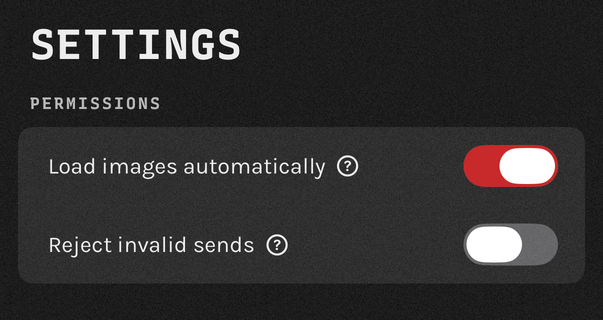
warning. With Reject invalid sends on in the app's Settings, the server answers
422 invalid_content instead and stores nothing. The switch is off by default.
Urgent alerts are per key
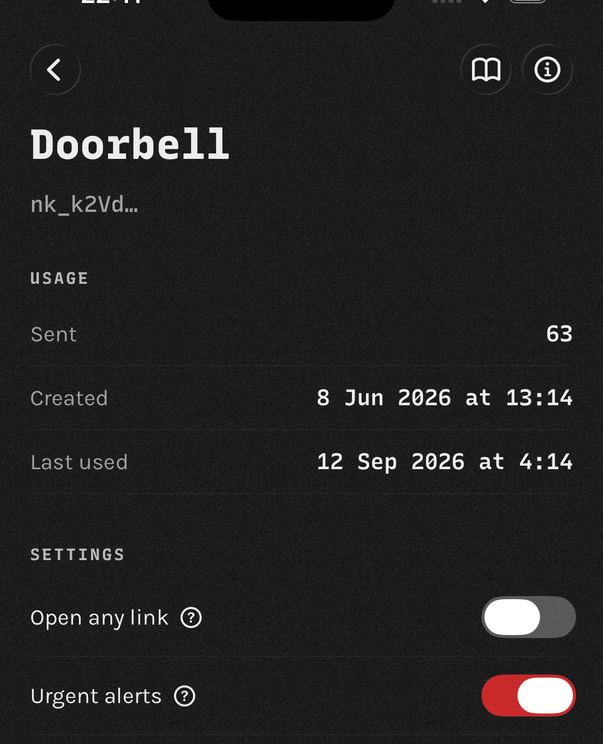
is_critical=1 asks for a Time Sensitive notification, which breaks through
Focus. It works only if the key has Urgent alerts on, in the app.
Otherwise notifi delivers an ordinary notification.
A link does not have to be https
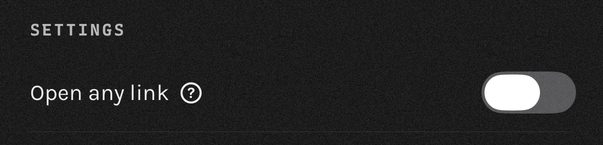
link accepts any URL scheme, so it can deep-link into another app. The app
opens only https until you switch on Open any link for the
key, and only the person holding the device can do that.
Errors
Every error nests the code one level down: read error.code. The
message is translated for a human reader, so match on the code.
| Status | error.code | Meaning |
|---|---|---|
400 |
invalid_request |
A parameter is missing or malformed. |
401 |
unknown_key |
The key is unknown or revoked. |
422 |
invalid_content |
The device is set to refuse a notification it cannot deliver as written. |
429 |
rate_limited |
Over the daily device limit or the per-minute IP limit. Carries a Retry-After header with the seconds until the window resets. |
429 |
uncollected_limit |
The device has 500 uncollected notifications. No Retry-After: the limit clears when the device next collects. Open the app on the device. |
404 |
not_found |
No such path. |
500 |
internal_error |
The server hit an unexpected error. |
Rate limits
- 25 notifications a day per device, shared across every key on it. The count resets at midnight UTC.
- 5 active send keys per device, one of which is the device key.
- 100 requests a minute per IP, across every endpoint.
- 500 uncollected notifications per device. Past that, the server refuses sends until the device collects.
- Revoking a key takes effect on the next send. Reinstalling the app, or moving to a new device, makes a new identity, and the old keys stop working with no way to migrate them.
A 429 carries Retry-After in seconds.
Clients and import
These come from the same source as this page. Set NOTIFI_KEY and send.
# Import → Link, then paste this. Postman keeps it in sync from there.
https://notifi.it/notifi.postman_collection.json
# Drop the .bru straight into a collection folder,
# or use Import → Postman Collection with the URL above.
curl -O https://notifi.it/notifi.bru
# Import From → URL takes either the OpenAPI document
# or the Postman collection.
https://notifi.it/openapi.json
# No import needed.
http -f POST https://notifi.it/send \
  "Authorization:Bearer $NOTIFI_KEY" \
  title="Hello from notifi" \
  message="Your first notification." \
  link="https://notifi.it/docs" \
  image="https://notifi.it/anaglyph-bell.png"
# Any generator that reads OpenAPI 3.1.
openapi-generator-cli generate \
  -i https://notifi.it/openapi.json \
  -g typescript-fetch \
  -o ./notifi
For agents and crawlers
/llms.txt: the full reference as plain text, written for coding agents./openapi.json: OpenAPI 3.1 for /send./notifi.postman_collection.json: Postman v2.1 collection. Bruno, Insomnia, Hoppscotch and Paw import it too./notifi.bru: a Bruno request file to drop into a collection folder./sitemap.xml: a list of the site’s pages./docs.md: this page as Markdown.
The site also serves every page as Markdown: send Accept: text/markdown, or
append .md.
One endpoint and a bearer token make up the whole surface. There is no MCP server and no OAuth.
Recipes
The same request in 15 languages and tools. Each expects
NOTIFI_KEY in the environment.
curl -X POST https://notifi.it/send \
  -H "Authorization: Bearer $NOTIFI_KEY" \
  -d "title=Hello from notifi" \
  -d "message=Your first notification." \
  -d "link=https://notifi.it/docs" \
  -d "image=https://notifi.it/anaglyph-bell.png"
await fetch("https://notifi.it/send", {
  method: "POST",
  headers: {
    "Authorization": `Bearer ${process.env.NOTIFI_KEY}`,
    "Content-Type": "application/json",
  },
  body: JSON.stringify({
    title: "Hello from notifi",
    message: "Your first notification.",
    link: "https://notifi.it/docs",
    image: "https://notifi.it/anaglyph-bell.png",
  }),
});
import os, requests

requests.post(
    "https://notifi.it/send",
    headers={"Authorization": f"Bearer {os.environ['NOTIFI_KEY']}"},
    json={
        "title": "Hello from notifi",
        "message": "Your first notification.",
        "link": "https://notifi.it/docs",
        "image": "https://notifi.it/anaglyph-bell.png",
    },
)
package main

import (
	"net/http"
	"net/url"
	"os"
	"strings"
)

func main() {
	form := url.Values{
		"title":   {"Hello from notifi"},
		"message": {"Your first notification."},
		"link":    {"https://notifi.it/docs"},
		"image":   {"https://notifi.it/anaglyph-bell.png"},
	}
	req, _ := http.NewRequest("POST", "https://notifi.it/send",
		strings.NewReader(form.Encode()))
	req.Header.Set("Authorization", "Bearer "+os.Getenv("NOTIFI_KEY"))
	req.Header.Set("Content-Type", "application/x-www-form-urlencoded")
	http.DefaultClient.Do(req)
}
import Foundation

var request = URLRequest(url: URL(string: "https://notifi.it/send")!)
request.httpMethod = "POST"
request.setValue("Bearer \(key)", forHTTPHeaderField: "Authorization")
request.setValue("application/json", forHTTPHeaderField: "Content-Type")
request.httpBody = try JSONEncoder().encode([
    "title": "Hello from notifi",
    "message": "Your first notification.",
    "link": "https://notifi.it/docs",
    "image": "https://notifi.it/anaglyph-bell.png",
])

_ = try await URLSession.shared.data(for: request)
require "net/http"

uri = URI("https://notifi.it/send")
req = Net::HTTP::Post.new(uri)
req["Authorization"] = "Bearer #{ENV['NOTIFI_KEY']}"
req.set_form_data(
  "title" => "Hello from notifi",
  "message" => "Your first notification.",
  "link" => "https://notifi.it/docs",
  "image" => "https://notifi.it/anaglyph-bell.png"
)

Net::HTTP.start(uri.host, uri.port, use_ssl: true) { |http| http.request(req) }
<?php
$ch = curl_init("https://notifi.it/send");
curl_setopt_array($ch, [
    CURLOPT_POST       => true,
    CURLOPT_HTTPHEADER => ["Authorization: Bearer " . getenv("NOTIFI_KEY")],
    CURLOPT_POSTFIELDS => [
        "title"   => "Hello from notifi",
        "message" => "Your first notification.",
        "link"    => "https://notifi.it/docs",
        "image"   => "https://notifi.it/anaglyph-bell.png",
    ],
]);
curl_exec($ch);
// reqwest = { version = "0.12", features = ["json"] }
let key = std::env::var("NOTIFI_KEY")?;

reqwest::Client::new()
    .post("https://notifi.it/send")
    .bearer_auth(key)
    .form(&[
        ("title", "Hello from notifi"),
        ("message", "Your first notification."),
        ("link", "https://notifi.it/docs"),
        ("image", "https://notifi.it/anaglyph-bell.png"),
    ])
    .send()
    .await?;
import java.net.URI;
import java.net.URLEncoder;
import java.net.http.HttpClient;
import java.net.http.HttpRequest;
import java.net.http.HttpResponse;
import java.util.function.BiFunction;
import static java.nio.charset.StandardCharsets.UTF_8;

BiFunction<String, String, String> field = (k, v) -> k + "=" + URLEncoder.encode(v, UTF_8);

var body = String.join("&",
    field.apply("title", "Hello from notifi"),
    field.apply("message", "Your first notification."),
    field.apply("link", "https://notifi.it/docs"),
    field.apply("image", "https://notifi.it/anaglyph-bell.png"));

var request = HttpRequest.newBuilder(URI.create("https://notifi.it/send"))
    .header("Authorization", "Bearer " + System.getenv("NOTIFI_KEY"))
    .header("Content-Type", "application/x-www-form-urlencoded")
    .POST(HttpRequest.BodyPublishers.ofString(body))
    .build();

HttpClient.newHttpClient().send(request, HttpResponse.BodyHandlers.discarding());
// Fires when Claude stops.
{
  "hooks": {
    "Stop": [{
      "hooks": [{
        "type": "command",
        "command": "curl -s https://notifi.it/send \
                     -H \"Authorization: Bearer $NOTIFI_KEY\" \
                     -d \"title=Claude finished\" \
                     -d \"message=$CLAUDE_PROJECT_DIR\""
      }]
    }]
  }
}
# Put NOTIFI_KEY in the repository's secrets.
- name: Tell me it broke
  if: failure()
  run: |
    curl -s https://notifi.it/send \
      -H "Authorization: Bearer $NOTIFI_KEY" \
      -d "title=$GITHUB_WORKFLOW failed" \
      -d "message=$GITHUB_REF_NAME at $(git log -1 --format=%s)" \
      -d "link=$GITHUB_SERVER_URL/$GITHUB_REPOSITORY/actions/runs/$GITHUB_RUN_ID"
  env:
    NOTIFI_KEY: ${{ secrets.NOTIFI_KEY }}
# Notify for any command that took longer than a minute, and say
# whether it worked.
autoload -Uz add-zsh-hook

_notifi_start() { _NOTIFI_T=$SECONDS; _NOTIFI_CMD=$1 }
_notifi_end() {
  local code=$? secs=$(( SECONDS - ${_NOTIFI_T:-SECONDS} ))
  (( secs < 60 )) && return
  curl -s https://notifi.it/send \
    -H "Authorization: Bearer $NOTIFI_KEY" \
    -d "title=$([[ $code == 0 ]] && echo ok || echo failed) after ${secs}s" \
    -d "message=$_NOTIFI_CMD" >/dev/null
}
add-zsh-hook preexec _notifi_start
add-zsh-hook precmd  _notifi_end
# crontab -e. A cron job gets no PATH, and its output goes nowhere you
# will read, so a job that quietly stopped working stays quiet for months.
# A literal % is a newline to cron: escape any you need as \%.
PATH=/usr/local/bin:/usr/bin:/bin
NOTIFI_KEY=...

0 3 * * * backup.sh >/tmp/backup.log 2>&1; curl -s https://notifi.it/send -H "Authorization: Bearer $NOTIFI_KEY" -d "title=backup $([ $? = 0 ] && echo ok || echo failed) on $(hostname)" --data-urlencode "message=$(tail -c 800 /tmp/backup.log)"
# Drop this in /etc/systemd/system/, then add one line to any unit:
#   OnFailure=notifi-failed@%n.service
# Every unit on the box can share it. %i is the unit that failed.
[Unit]
Description=Push a notification when %i fails

[Service]
Type=oneshot
EnvironmentFile=/etc/notifi.env
ExecStart=/usr/bin/curl -s https://notifi.it/send \
  -H "Authorization: Bearer $NOTIFI_KEY" \
  -d "title=%i failed on %H" \
  --data-urlencode "message=$(systemctl status %i --lines=10 --no-pager)"
# Put the key in a Secret, then curl at the end of any Job's command.
apiVersion: batch/v1
kind: CronJob
metadata:
  name: nightly-backup
spec:
  schedule: "0 3 * * *"
  jobTemplate:
    spec:
      template:
        spec:
          restartPolicy: Never
          containers:
          - name: backup
            image: alpine/curl
            command: ["/bin/sh", "-c"]
            args:
            - |
              ./backup.sh &&
              curl -s https://notifi.it/send \
                -H "Authorization: Bearer $NOTIFI_KEY" \
                -d "title=Backup complete"
            env:
            - name: NOTIFI_KEY
              valueFrom: { secretKeyRef: { name: notifi, key: key } }
Questions
The FAQ covers cost, limits, what the server can read and what happens when you delete the app. If yours isn't there, write to hello@notifi.it.